Deleting Outlook Meeting
When you delete a meeting from your Microsoft Outlook calendar, the Polyguard secure meeting link created for that meeting is not automatically deleted.
The secure meeting remains active in the Polyguard app unless it is manually removed.
What happens when you delete the Outlook meeting
- The calendar event is removed from Outlook
- The Polyguard secure meeting still exists
- The meeting link remains accessible until deleted in Polyguard
How to fully delete the Polyguard secure meeting
- Open the Polyguard app from the Outlook sidebar
- Go to Secure Meetings
- Find the meeting you want to remove
- Click the three dots next to Open Meeting
- Select Delete Meeting
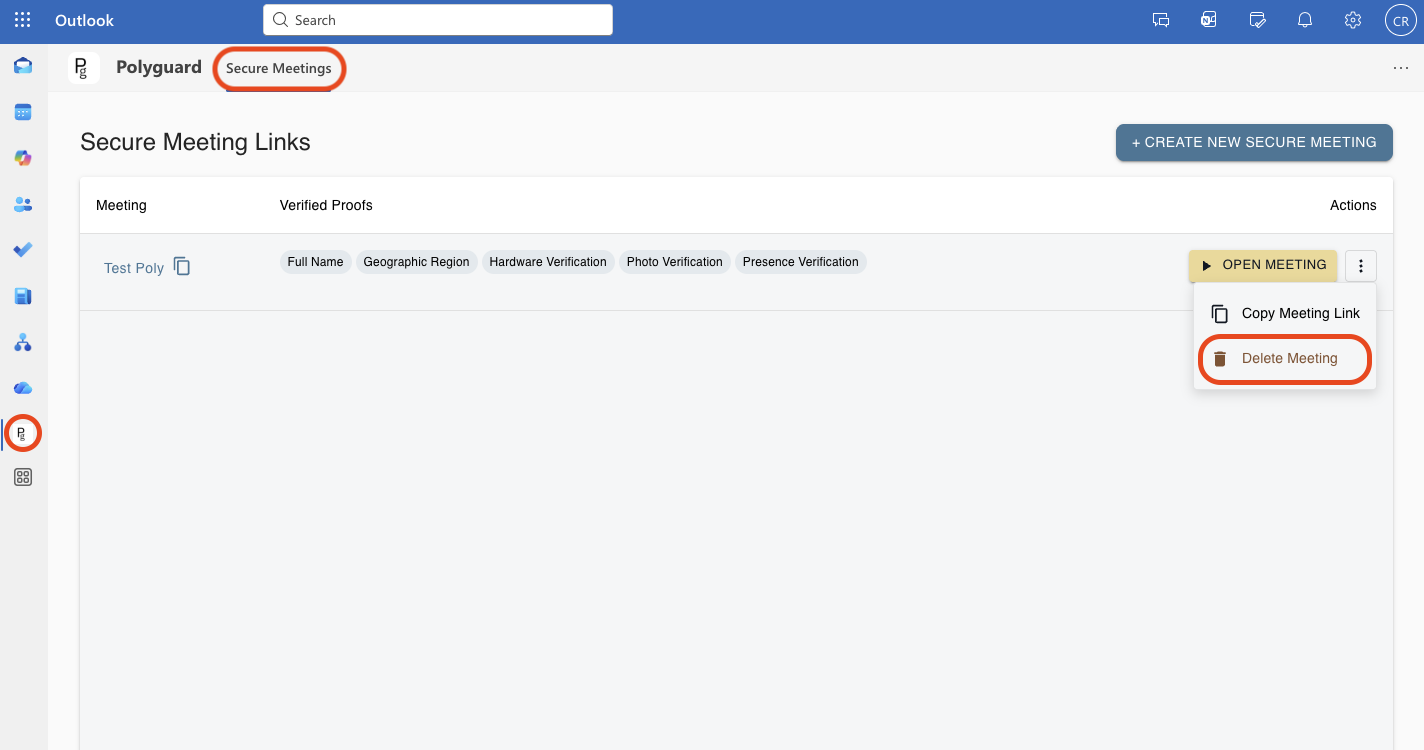
This permanently removes the meeting from the Polyguard Secure Meetings page.
About meeting logs
If the secure meeting was accessed at any point, even briefly, an entry will still appear in the Logs report.
Deleting the meeting does not remove log data.